May 8, 2026
Multi-Drop Delivery: Haulier's Guide to Planning 6+ Drops Without Losing Your Mind
Multi-drop delivery (one pickup with several drops, or several pickups with one drop) is the hardest job most dispatchers do, and the least talked about.
This piece is for the dispatcher planning these routes, whether you are a haulier doing depot-to-retail rounds, a container carrier with port-to-warehouse runs, or a distribution operator stitching cross-border milk runs.
This guide will cover the four multi-drop patterns, why dispatchers find them painful, the three ways hauliers handle them today, the hidden costs of getting it wrong, what good looks like in a transport management system (TMS), and a practical playbook you can use tomorrow.
What is a multi-drop delivery
Multi-drop delivery means one vehicle visiting multiple stops on the same trip, loading or unloading at each. It shows up in four shapes:
One pickup, many drops.
The classic depot-to-retail run. Load the lorry once, drop at six high-street stores. Common in food, parcel and distribution.
Many pickups, one drop.
Consolidation. Five suppliers around a region, all feeding one factory or distribution centre. Common in manufacturing, retail inbound, dairy.
Many pickups, many drops.
A true milk run, often contracted weekly: pick up at A, drop at B, pick up at C, drop at D. Common in line-haul, food retail, post and waste.
Round trip with empty return.
Container and intermodal work. Pick up a loaded box at the port, deliver it, return the empty (sometimes to a different port). Known as ABA or BAB moves.
This guide is for the people who plan these jobs (dispatchers, transport managers, owner-operators).
What makes multi-drop deliveries hard to manage
Multi-drop is not just “more stops”. It is a different job. It’s these five aspects that make it disproportionately complex:
Re-typing the same load.
A spreadsheet workflow enters the same parent order once for the customer, once for each drop, once for the driver’s run sheet, and once for the invoice. Four versions of the same truth, kept in sync by hand.
Back-and-forth phone tag with drivers.
McKinsey’s research on freight handovers found that B2B carriers’ dispatchers spend around 70% of their time on issues caused by blind handoffs between planning, drivers and customers. Multi-drop multiplies handoffs per route.
POD chaos.
Six drops, one signature page on a paper CMR, no easy way to prove what was accepted at drop 3 versus drop 4. When a customer disputes the goods, the conversation often ends with a partly filled CMR and a driver’s memory.
Mid-route reality.
Loads change hands during the run. Receivers move addresses. Customers are closed. One driver finishes shift and another picks up the route. None of this fits neatly into a route that was optimised at 6AM.
Invoicing leakage.
Wait time at drop 4, a ferry crossing to drop 5, a tail-lift charge at drop 6: lines not captured per stop quietly fall off the invoice.
The hardest part of multi-drop is not the routing maths. It is the orchestration around it.
The three ways carriers handle multi-drop today
Most hauliers move through these three approaches as they grow.
Approach 1: Excel, paper and a phone.
This is the most common way how most 5 to 20-truck hauliers run multi-drop. It works until it stops working, and the failure point usually arrives when volume goes up, the office team shrinks, or a customer asks for proof of a delivery (POD) nobody can find.
One of Planlogi’s customers described their previous “Excel + pen and paper” workflow as follows: “A call would come in, we would write it in a notebook (what, where, how much), and work out in our heads where it might fit on the truck. Things were a mess. Some orders came by email, some by phone - it was all over the place.“
The “Excel + pen and paper” workflow is fine for under 50 orders a month, single dispatcher, no anchor customer demanding eCMR. Beyond that, it starts taxing the people, not the trucks.
Approach 2: A standalone multi-stop route planner
The usual next step. Tools like Circuit, Routific, Maxoptra, Speedy Route, etc, do the route maths well: drag-and-drop stops, geocoded addresses, drive-time estimates, sometimes a basic driver app.
What they do not do is the rest of your business: customer records, invoices, eCMR proof of delivery, accounting sync, per-leg surcharges.
That work still happens, usually back in Excel, which means two systems to reconcile instead of one.
For pure last-mile parcel work with flat per-stop rates, Approach 2 is often enough. For a haulier with per-leg billable lines, cross-border eCMR or anchor-shipper integrations, it is only half a solution.
Approach 3: Multi-drop modelled inside a TMS
Dispatch, planning, driver app, ePOD, eCMR and invoicing in one carrier-first TMS. The dispatcher sees one job with multiple stops. The driver sees one route in the driver app. Accounting sees one invoice with per-leg lines already on it. The customer sees a tracking link.
This is also the direction the 2025 Gartner Magic Quadrant for TMS describes for serious operators, though most named tools are built for shippers rather than hauliers.
If you are above 50 orders per month and have any cross-border eCMR exposure, then Approach 3 is worth evaluating.
The hidden costs of getting multi-drop wrong
The visible cost of multi-drop is dispatcher hours, but the hidden costs are usually a lot more serious.
Disputed deliveries that never get paid.
One signature on a paper CMR covering six drops is not proof of any single drop. When a customer queries drop 4, you have nothing per stop to fall back on.
ML Transport runs several drops in Helsinki per truck and often leaves small consignments at an agreed spot when nobody is there. A driver photo with an automatic time and location stamp has already settled one damaged-packaging claim for them without a single email.
Surcharges that quietly disappear.
If you do not log when the wait clock started at drop 4, you will not bill for it. Multiply by 250 working days and that is several thousands in revenue gone.
Compliance risk under eFTI.
From 9 July 2027, EU national authorities must accept freight documents in electronic form via certified eFTI platforms. 2026 is widely seen as the practical turning point. If your eCMR is not sequenced per stop, multi-drop runs may not be compliance-ready when enforcement bites.
Dispatcher burnout.
Due to its many moving parts, multi-drop done in Excel is complex and frustrating. As your capacity grows, the problem multiplies instantly. We’ve heard it from dispatchers time and time again, that had it not been for Planlogi, they’d have seriously considered switching roles soon. So, the moral of the story is that it will cost you a lot more to replace a good dispatcher than a carrier-first TMS software, like Planlogi, will.
What good multi-drop in a TMS actually looks like
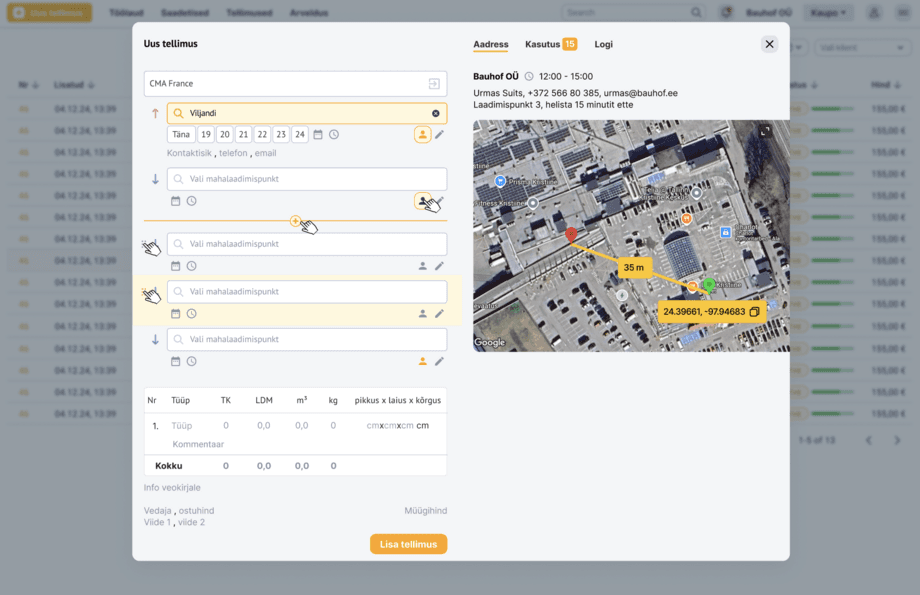
If you are evaluating a TMS for multi-drop, these six features matter most, in priority order:
Parent order with sequenced child stops.
One job in the dispatcher’s view, several stops in the driver’s. The dispatcher should not enter the same load three times.
Per-stop electronic proof of delivery (POD).
Signature, photo, GPS and timestamp captured per stop, exportable per leg. Research on eCMR adoption suggests it cuts admin time by around 60% and admin costs by around 70% versus paper. A TMS-native ePOD does the same for ordinary deliveries.
Mid-route changes that do not break payroll.
Address changes, customer no-shows and driver swaps should not require re-entering the order. Driver attribution should follow the work.
Per-leg billable lines.
Wait time, BAF (bunker adjustment factor, sometimes called fuel surcharge), demurrage, ferry, tail-lift charges should attach to the stop they happened at. If you cannot bill per leg, you will not bill at all.
Drag-and-drop sequencing on a map.
Visual planning beats algorithmic optimisation for most multi-drop work, because you know your customers and the algorithm does not. The vehicle routing problem is famously NP-hard, fancy maths for “a good dispatcher’s intuition is often the fastest path to a good answer”.
Multilingual driver app and accounting sync.
The driver needs the app in their first language. The accountant needs the invoice landing in Xero, QuickBooks, or Merit without re-keying.
If a tool does five of the six well, that is good enough to start. Fewer than four, keep looking.
How Planlogi solver multi-drop deliveries for dispatchers
Planlogi is a carrier-first TMS for hauliers with five to a hundred trucks.
Here is how dispatchers handle multi-drop with Planlogi.
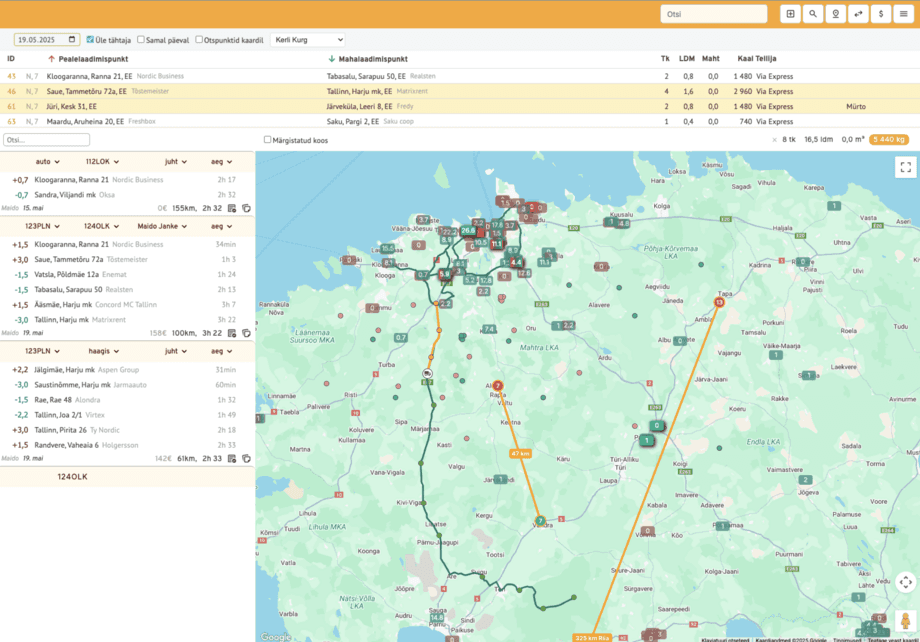
Dispatchers enter the parent order once. Each pickup or drop becomes a stop on the route.
The dispatcher works from a two-pane view: stops on the left (drag-and-drop to re-sequence), map on the right with live truck positions.
As each stop closes it turns green, and the dispatcher can plan the next pickup or drop without phoning the driver.
The driver app shows the whole route as a list, ticks off each stop, and captures the electronic proof of delivery: signature, photo, timestamp, GPS, per stop.
eCMR is supported alongside paper for cross-border work, which matters during the eFTI transition.
Per-leg billable lines (wait time, fuel surcharges, tail-lift, ferry) attach to the right stop.
Once all stops are green (orders completed), the dispatcher selects the route, simlpy clicks “compose invoice”, and the invoice goes out.
For example, one of Planlogi’s customers runs roughly 40 stops per route, twice a week, with one person handling everything that used to take two.
They sum their transition from Excel to Planlogi up:
Planlogi is not the right tool for everyone. If you are a pure last-mile parcel courier with no per-leg billing, a standalone route planner may serve you better.
If you are a 5 to 100-truck haulier doing line-haul, distribution, container or cross-border work, multi-drop is one of the things Planlogi is built around.
A 5-step multi-drop delivery playbook you can start using now
Although it would make multi-drop delivery planning a lot easier, you do not necessarily need new software to start fixing your processes today. These five habits sharpen any operation and make any future TMS rollout smoother.
Tag every multi-drop load with a parent reference.
Even in Excel. One load, one identifier, every stop linked to it. You will thank yourself the next time a customer queries “drop 3 of order PR-1248”.
Standardise per-stop POD capture.
Photo plus signature plus timestamp, every stop, no exceptions. If you are still on paper, give drivers a per-stop POD template, not a single page covering the whole run.
Track wait time and surcharges per leg, not per job.
When did the wait clock start at drop 4? Which stop incurred the ferry charge? If your team cannot answer those questions, invoices are leaking.
Give drivers a route view, not a stop-by-stop puzzle.
Drivers should see the full route, in order, in their first language. Tools that surface only the next stop are designed for gig couriers, not multi-drop hauliers.
Reconcile billable lines weekly, not monthly.
An invoice missed in week one is harder to claim in week four. Carriers who reconcile weekly typically recover one to three percent of revenue.
If you do these five things, you will run a tighter operation regardless of the tools you’re using.
To sum it up…
If multi-drop is your biggest operational headache, the cheapest first move is the playbook above. The next step is usually a 20-minute look at how a carrier-side TMS handles your workflow on a real route from your week. Get in touch and we will help you optimize your multi-drop delivery processes.
Frequently asked questions
What is multi-drop delivery and why is it so hard to plan?
Multi-drop delivery is a single vehicle visiting multiple stops on one trip, loading or unloading at each. It is hard not because of the routing maths, but because of the orchestration around it: re-keying the same load across orders, drivers and invoices, capturing proof of delivery per stop, tracking per-leg charges, and handling mid-route changes. Planlogi was built for hauliers who do this work daily, with parent-order and child-stop modelling, drag-and-drop sequencing, and per-stop ePOD in one screen.
Can a transport management system actually handle 40 stops on one route?
Yes. Tarvi Transport runs Planlogi with around 40 pickup or drop stops per route, twice a week, across Estonia and Finland, with a single office dispatcher. The dispatcher works from a two-pane view (stops on the left, live map on the right) and ticks stops off as they turn green. After moving from a notebook, the team plans around 25 percent more stops per week with the same fleet.
What is the difference between a route planner and a TMS for multi-drop?
A standalone route planner like Circuit, Routific or Maxoptra sequences stops on a map well, but does not handle orders, customer records, eCMR, per-leg billing or accounting sync. A carrier-side TMS like Planlogi puts dispatch, driver app, ePOD, eCMR and invoicing in one place, so a multi-drop run is a single job from order intake to paid invoice. For couriers doing pure last-mile parcel work a route planner can be enough; for hauliers with per-leg billing or cross-border eCMR it is half a solution. A worked example of that split, with prices, is in our Planlogi vs Impargo comparison.
How does multi-drop work with eCMR and the EU eFTI Regulation?
Each stop on a multi-drop route generates its own consignment note, captured with signature, photo, GPS and timestamp at the moment of delivery. Planlogi supports eCMR alongside paper for cross-border work, which matters during the eFTI transition. From 9 July 2027, EU national authorities must accept freight documents in electronic form via certified eFTI platforms, and 2026 is widely seen as the practical turning point. If your eCMR is not already sequenced per stop, multi-drop runs may not be compliance-ready when enforcement bites.
Can my drivers actually use a TMS app if they do not speak fluent English?
Yes. The Planlogi driver app shows the whole route as a list, ticks stops off one by one, and runs in the driver’s first language. European driver workforces are multilingual by default (Polish in DE, NL and the UK, Romanian in IT and ES, Russian-speakers in the Baltics) and language is often the difference between drivers using the app and quietly switching back to paper.
How do I bill wait time, BAF and ferry charges per stop without manual reconciliation?
In Planlogi, every billable line (wait time, BAF or fuel surcharge, tail-lift, ferry, demurrage) attaches to the specific stop it happened at, not to the whole route. When the dispatcher composes the invoice, the per-leg lines flow through automatically. This is how Tarvi Transport recovered four to five hours per week of admin time on invoicing alone after replacing notebook and paper CMR with Planlogi.
What happens when a driver swaps mid-route or a customer no-shows?
In a TMS designed for multi-drop, addresses can be changed and stops re-sequenced live, without re-entering the order, and driver attribution for payroll follows the work rather than the original assignment. Planlogi’s dispatcher view supports drag-and-drop re-sequencing and live truck status, so mid-route changes do not break the run or the payroll calculation.
How fast can a small haulier roll out a TMS for multi-drop work?
Planlogi rollouts typically take days to a few weeks, not months. The reason is depth, not breadth: the platform is built specifically for carriers with 5 to 100 trucks, so the workflow already matches how a haulier actually plans, dispatches and invoices a multi-drop route. Most onboarding starts with one office person on the system before driver tablets are configured.
Is Planlogi a tool for shippers or for carriers?
Carriers. Most TMS tools sold across Europe (Transporeon, project44, Cargoson) are designed for shippers and freight forwarders. Planlogi is built for the haulier side: the operator running their own trucks, planning the dispatch, capturing proof of delivery and invoicing the customer. Multi-drop is one of the core workflows it is designed around, alongside line-haul, distribution, container and cross-border work.
How can multi-drop scaling work without hiring a second dispatcher?
Most hauliers cap their growth at the office, not the yard. Adding trucks without adding office headcount requires the dispatcher’s screen to do the job that phone calls and spreadsheets used to do: live truck position, live stop status, drag-and-drop re-sequencing, automatic invoicing. Tarvi Transport scaled to 25 percent more weekly stops without a second office hire after switching from a notebook workflow to Planlogi.
Do I need to give up Excel completely to start using a multi-drop TMS?
Not on day one. Most Planlogi customers run Excel in parallel for the first week or two while the team gets used to the new dispatcher view. The goal of the rollout is to retire Excel, but a phased approach lowers risk and keeps the office calm during the switch. Some customers cut over completely on day one, like Tarvi Transport, but that is a choice, not a requirement.
How is Planlogi different from a route optimisation tool like Circuit or Routific?
A route optimisation tool sequences stops on a map. Planlogi handles the whole job: customer records, parent order with sequenced child stops, dispatcher view with live trucks, multilingual driver app, per-stop ePOD, eCMR, per-leg billable lines and one-click invoicing. For a haulier doing line-haul, distribution or cross-border work, this is the difference between a planning tool and an operating system for the business.