The Planlogi POD (proof of delivery) Inbox module lets you quickly and easily attach signed consignment notes to orders. Users can upload files directly from their computer or send them by email, keeping order management smooth and efficient.
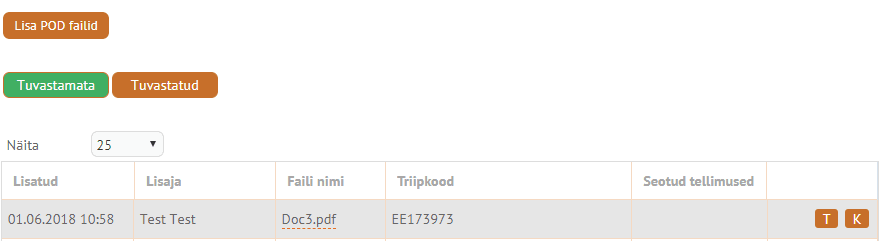
The POD (proof of delivery) Inbox module was developed to provide a fast way of attaching POD files to orders with as little effort as possible.
POD Inbox lets users either upload scanned, signed consignment notes to Planlogi directly from their own computer, or send them by email (to pod-IS@bot.planlogi.com).
These are sent to Planlogi as PDFs and linked to the order based on the information in the alternative barcode field. If a PDF has several pages, it is first split into single pages, and each page is searched for a barcode. Each page and each barcode found are added to the inbox as a separate entry. When a barcode is found, the same code is looked up in the orders’ alternative barcode field, the order number and the order reference. If the code is found, it is linked to the corresponding order and the file is automatically moved to the list of recognised orders in the POD Inbox. If the system cannot recognise the barcode and/or the order, the file stays in the unrecognised list, and the user can add the barcode themselves or re-run the recognition process later.
The maximum upload file size is 10 MB.
Recognised orders are automatically moved to OK status, and the uploaded file is added to the order’s file container as a public file. If the order is already in OK status or has already been archived, the order status is not changed, but the file is still added to the order’s file container as a public file.
When a POD is uploaded via the inbox, the system also checks whether dispatch information has been entered in the JV field. If it has, the usual process follows: the order is marked as OK and the file is added to the order’s file container. If it hasn’t, the system looks through the pre-manifests from the last 30 days for the same alternative barcode. If the code is found, the system takes the date and vehicle registration number from the pre-manifest and adds them to the JV (local distribution) field. Only then does the order move to OK status and the uploaded file get added to the order’s file container as a public file.
Since February 2019 we have been using more than one recognition attempt, and each attempt uses a different configuration from the others. All results from the attempts are also stored in the database as separate records. We have also improved the information shown for files being processed, so users can now see which files are still being processed and which could not be recognised. In addition, files that are being processed can no longer be deleted until processing has either completed successfully or ended with an error message.
Frequently asked questions
What is the Planlogi POD Inbox module?
Planlogi POD Inbox is a module that lets you quickly and easily attach signed consignment notes (proof of delivery) to orders, ensuring efficient order management.
How can files be uploaded to POD Inbox?
Files can be uploaded either directly from your computer to Planlogi or by emailing them to pod-IS@bot.planlogi.com. Files are sent as PDFs and linked to the order based on the barcode.
How does the system use the barcode to recognise POD files?
If a PDF contains several pages, it is split into separate pages and each page is searched for a barcode. If a barcode is found, it is linked to the order based on the alternative barcode, the order number or the order reference.
What happens to files the system cannot recognise automatically?
Files that are not recognised stay in the unrecognised list. The user can add the barcode themselves or re-run the recognition process later.
What is the maximum file size that can be uploaded to POD Inbox?
The maximum upload file size is 10 MB.
What happens to recognised orders in POD Inbox?
Recognised orders are automatically moved to OK status, and the uploaded file is added to the order’s file container as a public file. If the order is already in OK status or archived, the file is added to the container without changing the status.
How does POD Inbox behave if the JV field has no dispatch information?
The system searches the pre-manifests from the last 30 days for the same barcode and takes the date and vehicle registration number from there, adding them to the JV field. Only after that does the order move to OK status and the file get added to the file container.
Does POD Inbox make several recognition attempts?
Yes. Since February 2019, more than one attempt is used for recognition, with each attempt using a different configuration. All results are stored in the database as records.
Can files being processed be deleted before recognition is complete?
No. Files being processed cannot be deleted until processing has completed successfully or ended with an error message.
How does POD Inbox help streamline order management?
POD Inbox automates file recognition, links files to orders automatically and adds them to the correct container, reducing manual work and making the workflow more efficient.